---
title: Template settings
description: What are they for?
---
[Skip to content](https://support.biglelegal.com/en/knowledge-base/template-settings-1#main-content)
- [English](https://support.biglelegal.com/en/knowledge-base/template-settings-1)
- [Español](https://support.biglelegal.com/es/knowledge-base/apa)
English
Show submenu for translations
[Customer portal](https://support.biglelegal.com/tickets-view?hsLang=en)

Open main navigation
Close main navigation
- - [English](https://support.biglelegal.com/en/knowledge-base/template-settings-1)
- [Español](https://support.biglelegal.com/es/knowledge-base/apa)
English
Show submenu for translations
- [Customer portal](https://support.biglelegal.com/tickets-view)
Find what you are searching
- There are no suggestions because the search field is empty.
1. [Knowledge Base](https://support.biglelegal.com/en/knowledge-base?hsLang=en)
2. [Template - Settings](https://support.biglelegal.com/en/knowledge-base/template-settings?hsLang=en)
# Template settings
## What are they for?
Within a template, in the settings section, we can find 2 subsections: Information and Details.
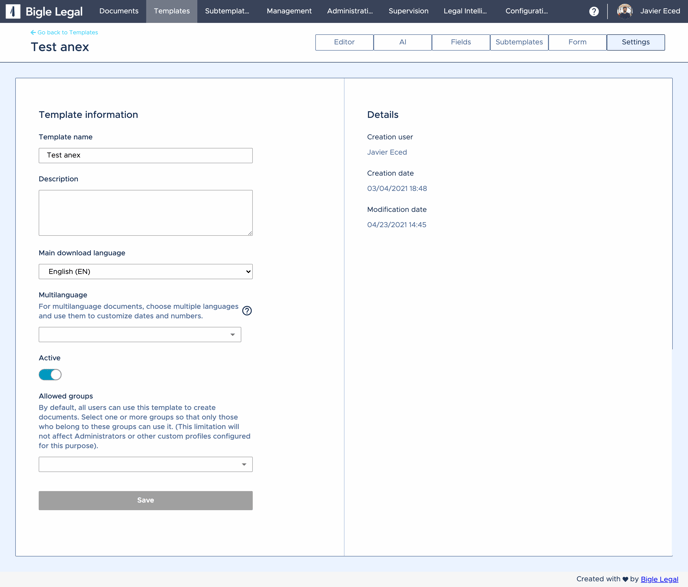
On the left side, we find the **Template information**, which includes the editable options of this section, such as:
1. **Template name**: this is the name we gave the template when we created it. We can modify it when necessary.
2. **Description**: as its name suggests, this space is used to provide additional information.
3. **Main download language**: this option, which by default is the language of the platform (at the time the document was created), allows us to choose the language format in which we want the date or number fields to be displayed in the final document. [Find out more here ⇢](https://support.biglelegal.com/en/knowledge-base/template-settings-1#downloadLanguage)
4. **Multilanguage**: When we want the same field to appear in the document but in different language formats. [Find out more here ⇢](https://support.biglelegal.com/en/knowledge-base/template-settings-1#Multilanguage)
5. **Active**: Used to make a template available for document creation. As long as it is not active, it will remain in editing mode, thus preventing any misuse before it is finalised.
6. **Allowed groups**: Each template can be assigned to one or more groups exclusively. If none of them are marked, it will be available for use by all of them. [Find out more here ⇢](https://support.biglelegal.com/en/knowledge-base/template-settings-1#Allowed-group)
On the right side, we find the **Details**:
1. **Creation user**: Person who created the template.
2. **Creation date**: Date and time the template was created.
3. **Modification date**: Last time the template has undergone any change.
#### **Main download language**
The download language is nothing more than an indication of how we want to reflect in the document the [date](https://support.biglelegal.com/en/knowledge-base/field-date?hsLang=en), [numerical, monetary or percentage](https://support.biglelegal.com/en/knowledge-base/field-number?hsLang=en) value formats (also, when they are [transformed into words](https://support.biglelegal.com/en/knowledge-base/tags-for-transformation-of-numbers-into-letters?hsLang=en)).
When we create a template, it acquires the default language that the platform has at that moment, but we can also change the format to our needs within the options currently available on the platform.
When we choose one of the available languages, it will mean that each date, numeric, monetary or percentage value field and its automatic transformation into words will be defined by this configuration. Let's see some examples in each of the languages:
**Date formats:**
Spanish: **2 de marzo de 2021**
English: **March 2, 2021**
German: **2. März 2021**
Austrian German: **2. März 2021**
Catalan: **2 de març de 2021**
French: **2 mars 2021**
Italian: **2 marzo 2021**
Portuguese: **2 de março de 2021**
**Numeric currency formats:**
Spanish: **8.221 €** English: **€ 8,221**German: **8.221 €** Austrian German: **€ 8.221**Catalan: **8.221 €**
French: **8.221 €**
Italian: **8.221 €**
Portuguese: **€ 8,221**
**Numeric currency formats + transformation to text:**
Spanish: 8.221 € (**OCHO MIL DOSCIENTOS VEINTIÚN EUROS**)
English: € 8,221 (**EIGHT THOUSAND TWO HUNDRED AND TWENTY-ONE EUROS**)
German: 8.221 € (**ACHTTAUSENDZWEIHUNDERTUNDEINUNDZWANZIG EUROS**)
Austrian German: € 8.221 (**ACHTTAUSENDZWEIHUNDERTUNDEINUNDZWANZIG EUROS**)
Catalan: 8.221 € (**VUITMIL DOS-CENTS VINT-I-UN EUROS**)
French: 8.221 € (**HUIT MILLE DEUX CENT VINGT ET UN EUROS**)
Italian: 8.221 € (**OTTOMILA DUECENTOVENTUNO EURO**)
Portuguese: € 8.221 (**OITO MIL DUZENTOS E VINTE E UM EUROS**)
[Go back to the top](https://support.biglelegal.com/en/knowledge-base/template-settings-1#back-top)
#### **Multilanguage**
Currently there are eight languages in the platform for [date](https://support.biglelegal.com/en/knowledge-base/field-date?hsLang=en), [numeric, monetary or percentage](https://support.biglelegal.com/es/knowledge-base/campo-numero?hsLang=en) value fields and their automatic [transformation into words](https://support.biglelegal.com/en/knowledge-base/tags-for-transformation-of-numbers-into-letters?hsLang=en).
The first step for this automatic transformation to be effective is to write the tag by adding an underscore and the abbreviation of the language in capital letters:
Spanish: {tag\_**ES**}
English: {tag\_**EN**}
German: {tag\_**DE**}
Austrian German: {tag\_**DE\_AT**}
Catalan: {tag\_**CA**}
French: {tag\_**FR**}
Italian: {tag\_**IT**}
Portuguese: {tag\_**PT**}
Then, for the platform to correctly identify the tags, we must **select all the languages used through the "Multilanguage" dropdown**, in the template/settings/information section:
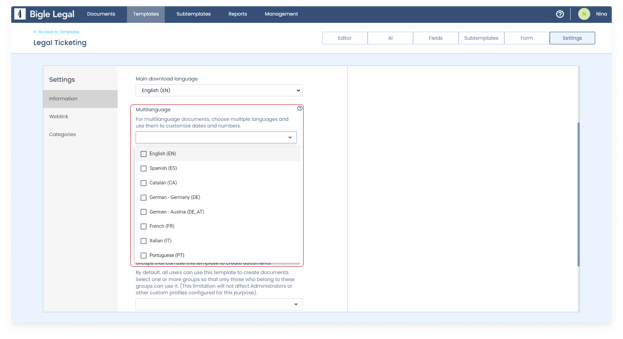
Let's say for example that we have 2 languages in the document. Using the same tag but with different language endings, the answer given in the form will be automatically adapted in each of the parts:
*\[...\] property specified above as of **{date\_EN}**, excluding the corresponding taxes in \[...\]*
*\[...\] propiedad anteriormente especificado a fecha de **{fecha\_ES}**, sin incluir los impuestos correspondientes en \[...\]*
The result of how it would look in the final document would be:
*\[...\] property specified above as of **2 March 2021**, exclusive of applicable taxes in \[...\]*
*\[...\] propiedad anteriormente especificado a fecha de **2 de marzo de 2021**, sin incluir los impuestos correspondientes en \[...\]*
This functionality is really useful when we have several languages in the same document, as just by asking a question in the form, it can be represented in several places with different language formats.
[Go back to the top](https://support.biglelegal.com/en/knowledge-base/template-settings-1#back-top)
#### Allowed groups
Restricting a template to certain groups
Each template can be assigned to one or several groups exclusively, so that only they can use it to create documents. This can be found in the Settings section of a template and will allow you to choose between all the groups you have created.
By default, this field is empty when we create a template and all the users of our workspace can use said template to create documents. As soon as we select a group, only that group will be able to use it to generate documents.
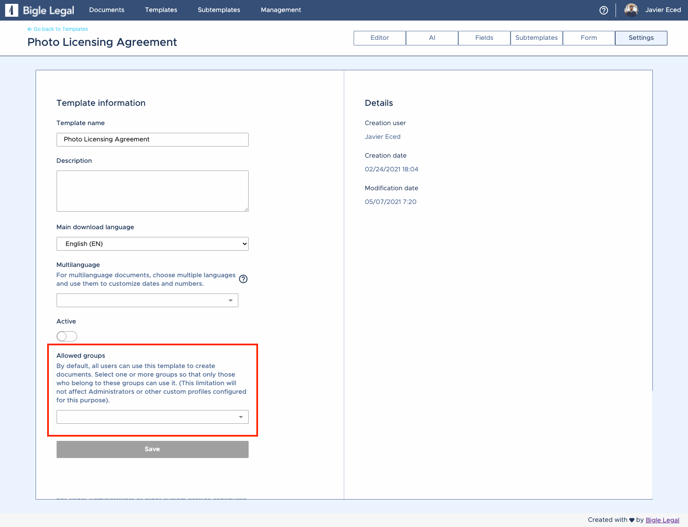
**This limitation will not affect Administrators or other custom profiles configured for this purpose.**
[Go back to the top](https://support.biglelegal.com/en/knowledge-base/template-settings-1#back-top)
- [Platform Updates](https://support.biglelegal.com/en/knowledge-base/platform-updates?hsLang=en)
- [On-demand webinars](https://support.biglelegal.com/en/knowledge-base/on-demand-webinars?hsLang=en)
- [New in Bigle](https://support.biglelegal.com/en/knowledge-base/new-in-bigle?hsLang=en#main-content)
- [0. Introduction](https://support.biglelegal.com/en/knowledge-base/new-in-bigle?hsLang=en#0-introduction)
- [1. Template creation](https://support.biglelegal.com/en/knowledge-base/new-in-bigle?hsLang=en#1-template-creation)
- [2. Creation of fields](https://support.biglelegal.com/en/knowledge-base/new-in-bigle?hsLang=en#2-creation-of-fields)
- [3. Creation of forms](https://support.biglelegal.com/en/knowledge-base/new-in-bigle?hsLang=en#3-creation-of-forms)
- [Templates - Create tags](https://support.biglelegal.com/en/knowledge-base/templates-create-tags?hsLang=en#main-content)
- [Introduction](https://support.biglelegal.com/en/knowledge-base/templates-create-tags?hsLang=en#introduction)
- [Type of tags](https://support.biglelegal.com/en/knowledge-base/templates-create-tags?hsLang=en#type-of-tags)
- [Types of use of opening and closing tags](https://support.biglelegal.com/en/knowledge-base/templates-create-tags?hsLang=en#types-of-use-of-opening-and-closing-tags)
- [Settings](https://support.biglelegal.com/en/knowledge-base/templates-create-tags?hsLang=en#settings)
- [Templates - Fields](https://support.biglelegal.com/en/knowledge-base/templates-fields?hsLang=en)
- [Template - Form](https://support.biglelegal.com/en/knowledge-base/template-form?hsLang=en)
- [Template - Settings](https://support.biglelegal.com/en/knowledge-base/template-settings?hsLang=en)
- [Sub-template](https://support.biglelegal.com/en/knowledge-base/sub-template?hsLang=en)
- [Metadata and Reports](https://support.biglelegal.com/en/knowledge-base/metadata-and-reports?hsLang=en)
- [Documents](https://support.biglelegal.com/en/knowledge-base/documents?hsLang=en#main-content)
- [Document management and organization](https://support.biglelegal.com/en/knowledge-base/documents?hsLang=en#document-management-and-organization)
- [Massive actions](https://support.biglelegal.com/en/knowledge-base/documents?hsLang=en#massive-actions)
- [Document options](https://support.biglelegal.com/en/knowledge-base/documents?hsLang=en#document-options)
- [Processes](https://support.biglelegal.com/en/knowledge-base/documents?hsLang=en#processes)
- [Bigle AI](https://support.biglelegal.com/en/knowledge-base/bigle-ai?hsLang=en#main-content)
- [Document Assistant](https://support.biglelegal.com/en/knowledge-base/bigle-ai?hsLang=en#document-assistant)
- [Discriminative AI](https://support.biglelegal.com/en/knowledge-base/bigle-ai?hsLang=en#discriminative-ai)
- [Libra: General AI Chat on the Platform](https://support.biglelegal.com/en/knowledge-base/bigle-ai?hsLang=en#libra-general-ai-chat-on-the-platform)
- [Requests](https://support.biglelegal.com/en/knowledge-base/requests?hsLang=en)
- [Edition](https://support.biglelegal.com/en/knowledge-base/edition?hsLang=en)
- [Negotiation](https://support.biglelegal.com/en/knowledge-base/negotiation?hsLang=en)
- [Validation](https://support.biglelegal.com/en/knowledge-base/validation?hsLang=en)
- [Electronic signature](https://support.biglelegal.com/en/knowledge-base/electronic-signature?hsLang=en)
- [Workflows](https://support.biglelegal.com/en/knowledge-base/workflows?hsLang=en)
- [Certified Email](https://support.biglelegal.com/en/knowledge-base/certified-email?hsLang=en)
- [Tasks](https://support.biglelegal.com/en/knowledge-base/tasks?hsLang=en)
- [Administration and Security](https://support.biglelegal.com/en/knowledge-base/administration-and-security?hsLang=en)
- [Customize the platform](https://support.biglelegal.com/en/knowledge-base/customize-the-platform?hsLang=en)
- [Integrations](https://support.biglelegal.com/en/knowledge-base/integrations?hsLang=en#main-content)
- [No-code universal connector](https://support.biglelegal.com/en/knowledge-base/integrations?hsLang=en#no-code-universal-connector)
- [Bigle Legal API](https://support.biglelegal.com/en/knowledge-base/integrations?hsLang=en#bigle-legal-api)
[](https://www.biglelegal.com/press/bigle-ranks-26-in-deloitte-technology-fast-50-2026)
Copyright © 2026, Bigle Iberia, S.L.