---
title: Multiple choice
description: Field to choose one or more options.
---
[Skip to content](https://support.biglelegal.com/en/knowledge-base/field-multiple-choice#main-content)
- [English](https://support.biglelegal.com/en/knowledge-base/field-multiple-choice)
- [Español](https://support.biglelegal.com/es/knowledge-base/campo-opcion-multiple)
English
Show submenu for translations
[Customer portal](https://support.biglelegal.com/tickets-view?hsLang=en)

Open main navigation
Close main navigation
- - [English](https://support.biglelegal.com/en/knowledge-base/field-multiple-choice)
- [Español](https://support.biglelegal.com/es/knowledge-base/campo-opcion-multiple)
English
Show submenu for translations
- [Customer portal](https://support.biglelegal.com/tickets-view)
Find what you are searching
- There are no suggestions because the search field is empty.
1. [Knowledge Base](https://support.biglelegal.com/en/knowledge-base?hsLang=en)
2. [Templates - Fields](https://support.biglelegal.com/en/knowledge-base/templates-fields?hsLang=en)
# Multiple choice
## Field to choose one or more options.
The **multiple choice** field is one of three choice fields (along with the [single choice](https://support.biglelegal.com/en/knowledge-base/field-single-choice?hsLang=en) and the [dropdown](https://support.biglelegal.com/en/knowledge-base/field-dropdown?hsLang=en)). It allows us to **select one or more options among several previously personalized possibilities**.

For the field to work properly, you need to **set its tags in the template document**. In [this article](https://support.biglelegal.com/en/knowledge-base/tags-for-option-fields?hsLang=en#p1.2) on “Tags for option fields” you will find all the necessary information on how to do it.
### **Description of the multiple choice field options**
- **Title:** text that describes the purpose of the field.
- **Tag:** you must introduce the same tag that you have written in the "template document" so that the field is correctly linked with its position in the document.
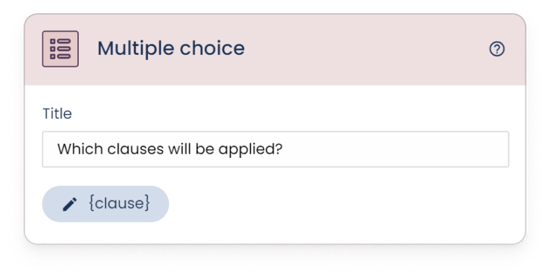
***Set options***
In this section you must introduce all the options that you want the field to have. Each option consists of:
- **Title:** this is the name or value that describes the option.
- **Option tag:** here you will write the tag that will refer to this option. [This article](https://support.biglelegal.com/en/knowledge-base/tags-for-option-fields?hsLang=en#p1.2) shows you how to configure the tags for option fields in the document.
Use the “**Add option**” button to add as many options as needed.
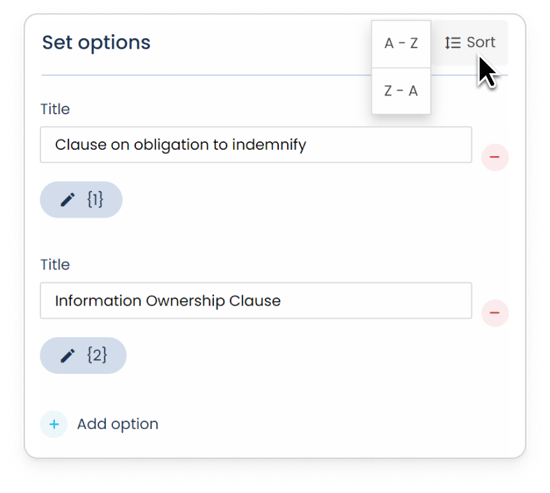
By clicking the "Sort" button, you can **sort the options** in alphabetical order (from A to Z, or from Z to A).
***Advanced options***
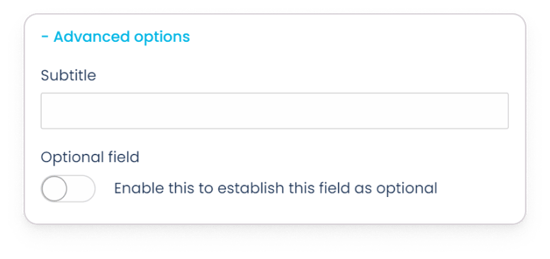
**1. Subtitle:** used in case you want to add additional information to the title.
**2. Optional field:** used to make the field required or optional. When activated, you will be telling the software that this field, despite being asked, will not necessarily have to be answered.
******
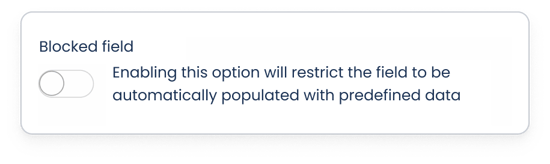
**3. Blocked field:** enabling this option will restrict the field to be automatically populated with predefined data, whether by internal means (copying data from another document) or external (bulk document creation, integrations, API...).
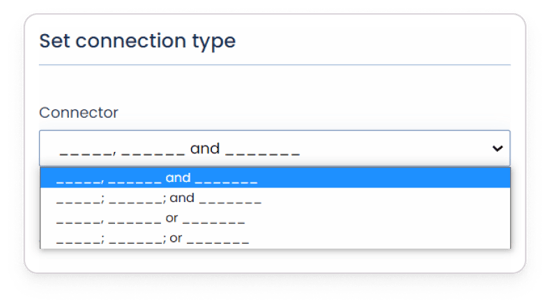
**4. Set connection type:** if you have [configured the tags to automatically add connectors](https://support.biglelegal.com/en/knowledge-base/tags-for-option-fields?hsLang=en#p2.1) between the titles of the options, in this section you can choose the desired option of punctuation marks ("**,**" or "**;**") and conjunctions ("**and**" or "**or**").
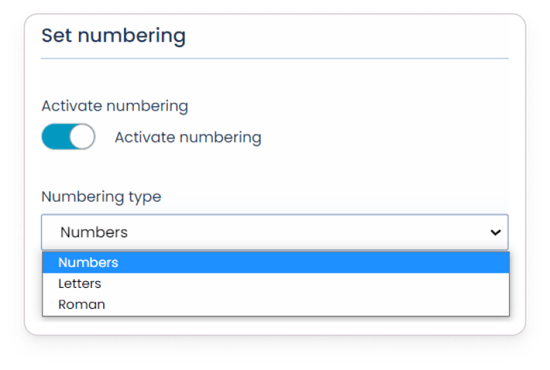
**5. Set numbering:** if you have [configured the tags to automatically add numbering to the title of each option](https://support.biglelegal.com/en/knowledge-base/tags-for-option-fields?hsLang=en#p2.2), in this section you will have to **activate** **numbering** and then select the desired **option** through the dropdown (numbers, letters or roman).
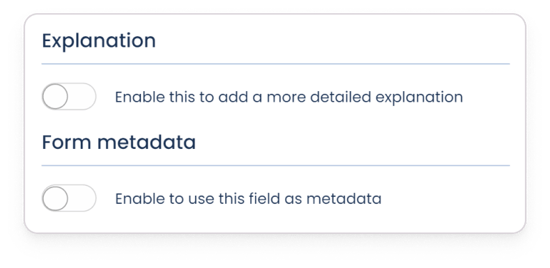
**6. Explanation:** if you activate this option, you can add detailed instructions or explanations that serve as support when filling the field in the form.
**7. Form metadata:** if enabled, the values entered in this field will be saved and used as [metadata](https://support.biglelegal.com/en/knowledge-base/metadata?hsLang=en).
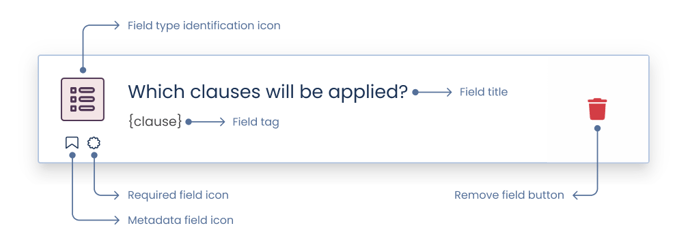
**Once the field is set up,** save the changes. The card folds, showing **information** to check the basic configuration of the field:
- [Platform Updates](https://support.biglelegal.com/en/knowledge-base/platform-updates?hsLang=en)
- [On-demand webinars](https://support.biglelegal.com/en/knowledge-base/on-demand-webinars?hsLang=en)
- [New in Bigle](https://support.biglelegal.com/en/knowledge-base/new-in-bigle?hsLang=en#main-content)
- [0. Introduction](https://support.biglelegal.com/en/knowledge-base/new-in-bigle?hsLang=en#0-introduction)
- [1. Template creation](https://support.biglelegal.com/en/knowledge-base/new-in-bigle?hsLang=en#1-template-creation)
- [2. Creation of fields](https://support.biglelegal.com/en/knowledge-base/new-in-bigle?hsLang=en#2-creation-of-fields)
- [3. Creation of forms](https://support.biglelegal.com/en/knowledge-base/new-in-bigle?hsLang=en#3-creation-of-forms)
- [Templates - Create tags](https://support.biglelegal.com/en/knowledge-base/templates-create-tags?hsLang=en#main-content)
- [Introduction](https://support.biglelegal.com/en/knowledge-base/templates-create-tags?hsLang=en#introduction)
- [Type of tags](https://support.biglelegal.com/en/knowledge-base/templates-create-tags?hsLang=en#type-of-tags)
- [Types of use of opening and closing tags](https://support.biglelegal.com/en/knowledge-base/templates-create-tags?hsLang=en#types-of-use-of-opening-and-closing-tags)
- [Settings](https://support.biglelegal.com/en/knowledge-base/templates-create-tags?hsLang=en#settings)
- [Templates - Fields](https://support.biglelegal.com/en/knowledge-base/templates-fields?hsLang=en)
- [Template - Form](https://support.biglelegal.com/en/knowledge-base/template-form?hsLang=en)
- [Template - Settings](https://support.biglelegal.com/en/knowledge-base/template-settings?hsLang=en)
- [Sub-template](https://support.biglelegal.com/en/knowledge-base/sub-template?hsLang=en)
- [Metadata and Reports](https://support.biglelegal.com/en/knowledge-base/metadata-and-reports?hsLang=en)
- [Documents](https://support.biglelegal.com/en/knowledge-base/documents?hsLang=en#main-content)
- [Document management and organization](https://support.biglelegal.com/en/knowledge-base/documents?hsLang=en#document-management-and-organization)
- [Massive actions](https://support.biglelegal.com/en/knowledge-base/documents?hsLang=en#massive-actions)
- [Document options](https://support.biglelegal.com/en/knowledge-base/documents?hsLang=en#document-options)
- [Processes](https://support.biglelegal.com/en/knowledge-base/documents?hsLang=en#processes)
- [Bigle AI](https://support.biglelegal.com/en/knowledge-base/bigle-ai?hsLang=en#main-content)
- [Document Assistant](https://support.biglelegal.com/en/knowledge-base/bigle-ai?hsLang=en#document-assistant)
- [Discriminative AI](https://support.biglelegal.com/en/knowledge-base/bigle-ai?hsLang=en#discriminative-ai)
- [Libra: General AI Chat on the Platform](https://support.biglelegal.com/en/knowledge-base/bigle-ai?hsLang=en#libra-general-ai-chat-on-the-platform)
- [Requests](https://support.biglelegal.com/en/knowledge-base/requests?hsLang=en)
- [Edition](https://support.biglelegal.com/en/knowledge-base/edition?hsLang=en)
- [Negotiation](https://support.biglelegal.com/en/knowledge-base/negotiation?hsLang=en)
- [Validation](https://support.biglelegal.com/en/knowledge-base/validation?hsLang=en)
- [Electronic signature](https://support.biglelegal.com/en/knowledge-base/electronic-signature?hsLang=en)
- [Workflows](https://support.biglelegal.com/en/knowledge-base/workflows?hsLang=en)
- [Certified Email](https://support.biglelegal.com/en/knowledge-base/certified-email?hsLang=en)
- [Tasks](https://support.biglelegal.com/en/knowledge-base/tasks?hsLang=en)
- [Administration and Security](https://support.biglelegal.com/en/knowledge-base/administration-and-security?hsLang=en)
- [Customize the platform](https://support.biglelegal.com/en/knowledge-base/customize-the-platform?hsLang=en)
- [Integrations](https://support.biglelegal.com/en/knowledge-base/integrations?hsLang=en#main-content)
- [No-code universal connector](https://support.biglelegal.com/en/knowledge-base/integrations?hsLang=en#no-code-universal-connector)
- [Bigle Legal API](https://support.biglelegal.com/en/knowledge-base/integrations?hsLang=en#bigle-legal-api)
[](https://www.biglelegal.com/press/bigle-ranks-26-in-deloitte-technology-fast-50-2026)
Copyright © 2026, Bigle Iberia, S.L.