---
title: Platform Updates - February 2026
description: Platform Updates - February 2026
---
[Skip to content](https://support.biglelegal.com/en/knowledge-base/platform-updates-february-2026#main-content)
- [English](https://support.biglelegal.com/en/knowledge-base/platform-updates-february-2026)
- [Español](https://support.biglelegal.com/es/knowledge-base/novedades-de-la-plataforma-febrero-2026)
English
Show submenu for translations
[Customer portal](https://support.biglelegal.com/tickets-view?hsLang=en)

Open main navigation
Close main navigation
- - [English](https://support.biglelegal.com/en/knowledge-base/platform-updates-february-2026)
- [Español](https://support.biglelegal.com/es/knowledge-base/novedades-de-la-plataforma-febrero-2026)
English
Show submenu for translations
- [Customer portal](https://support.biglelegal.com/tickets-view)
Find what you are searching
- There are no suggestions because the search field is empty.
1. [Knowledge Base](https://support.biglelegal.com/en/knowledge-base?hsLang=en)
2. [Platform Updates](https://support.biglelegal.com/en/knowledge-base/platform-updates?hsLang=en)
# Platform Updates - February 2026
## This article compiles the updates, improvements, and new features implemented on the platform during February 2026.
### **Version 29.0.14 - February 3rd**
This update focuses on improving real-time collaboration, navigation within document management, and workflow customization.
#### **1. New "Verifier" role in signature processes**
The available roles within the signature steps are expanded. In addition to signers and people in copy (CC), you can now add participants with the **Certificate** role.
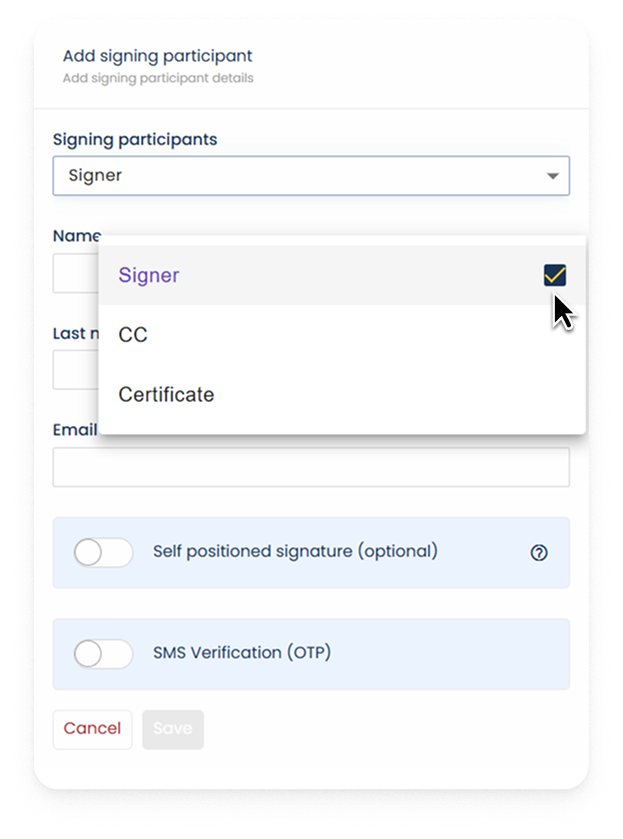
This profile has the ability to approve the content of a document within the signature process without needing to legally sign the document, allowing an extra layer of validation.
You can see more details about this new participant in the [following article](https://support.biglelegal.com/en/knowledge-base/how-to-e-sign-with-bigle?hsLang=en).
#### **2. Quick navigation between folders (Breadcrumbs)**
The top navigation bar has been optimized to speed up movement between subfolders and folders.
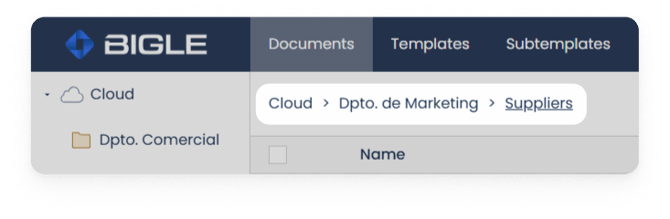
You can now click directly on the name of any previous folder in the navigation path (breadcrumbs) to return to it, without having to go back to the start or the "Cloud".
#### **3. Folder search**
The search engine in the documents section expands its capabilities. In addition to locating documents, it now allows searching for specific folders.
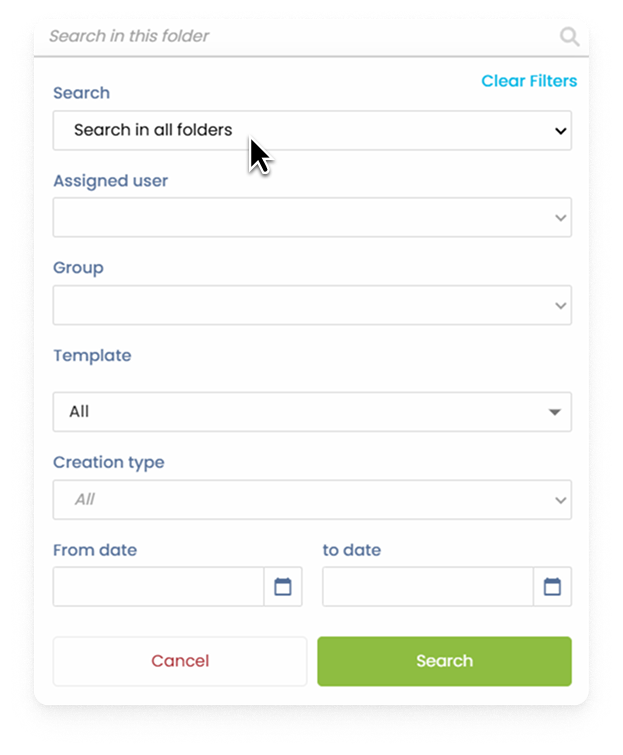
For more accurate results, it is advisable to define advanced search parameters when performing the query.
#### **4. Temporary editing lock on forms**
To prevent conflicts when multiple users try to work on the same document, the system now detects simultaneous editing.
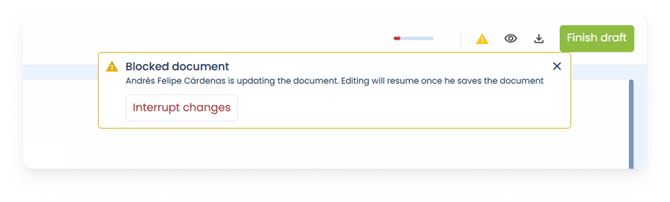
- If you try to access a form that another user is editing, an informational message will appear in the top right corner indicating that the document is temporarily locked.
- Access will be automatically enabled for the next user once the current person finishes their editing.
This functionality is not active by default. If you wish to activate it in your Workspace, contact the support team at [**support@biglelegal.com**](mailto:soporte@biglelegal.com)
#### **5. Default CC user configuration in Workflows**
Within the automated workflow configuration, a new functionality is added for the signature steps.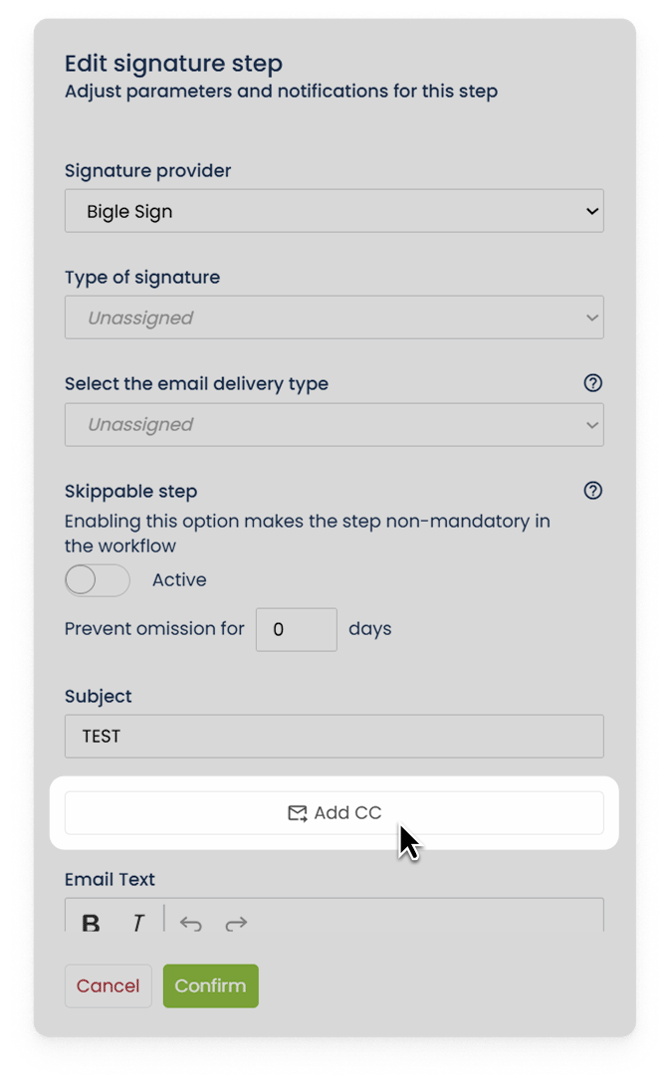
- In the **Manage \> Workflows** section, when editing a signature step, it is now possible to predefine a default user in copy (CC).
This option is ideal for standardized processes where the same participant or department must always be notified.
You can see more details on how to configure workflows within your workspace in the [following article.](https://support.biglelegal.com/en/knowledge-base/workflows-1?hsLang=en)
#### **6. New data columns in Reports**
Administrators now have more display options in the Reports section to facilitate the location and status of submissions.
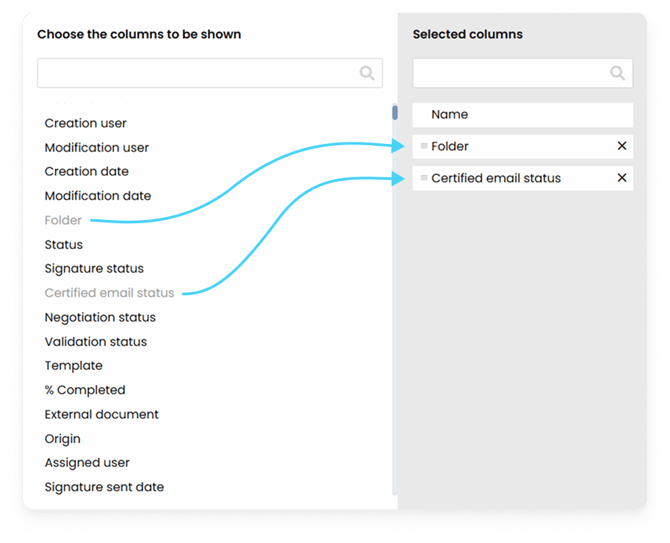
**New available columns:**
- **Folder:** Identifies the exact location where the document is found.
- **Certified email status:** Displays the current status of certified submissions.
- [Platform Updates](https://support.biglelegal.com/en/knowledge-base/platform-updates?hsLang=en)
- [On-demand webinars](https://support.biglelegal.com/en/knowledge-base/on-demand-webinars?hsLang=en)
- [New in Bigle](https://support.biglelegal.com/en/knowledge-base/new-in-bigle?hsLang=en#main-content)
- [0. Introduction](https://support.biglelegal.com/en/knowledge-base/new-in-bigle?hsLang=en#0-introduction)
- [1. Template creation](https://support.biglelegal.com/en/knowledge-base/new-in-bigle?hsLang=en#1-template-creation)
- [2. Creation of fields](https://support.biglelegal.com/en/knowledge-base/new-in-bigle?hsLang=en#2-creation-of-fields)
- [3. Creation of forms](https://support.biglelegal.com/en/knowledge-base/new-in-bigle?hsLang=en#3-creation-of-forms)
- [Templates - Create tags](https://support.biglelegal.com/en/knowledge-base/templates-create-tags?hsLang=en#main-content)
- [Introduction](https://support.biglelegal.com/en/knowledge-base/templates-create-tags?hsLang=en#introduction)
- [Type of tags](https://support.biglelegal.com/en/knowledge-base/templates-create-tags?hsLang=en#type-of-tags)
- [Types of use of opening and closing tags](https://support.biglelegal.com/en/knowledge-base/templates-create-tags?hsLang=en#types-of-use-of-opening-and-closing-tags)
- [Settings](https://support.biglelegal.com/en/knowledge-base/templates-create-tags?hsLang=en#settings)
- [Templates - Fields](https://support.biglelegal.com/en/knowledge-base/templates-fields?hsLang=en)
- [Template - Form](https://support.biglelegal.com/en/knowledge-base/template-form?hsLang=en)
- [Template - Settings](https://support.biglelegal.com/en/knowledge-base/template-settings?hsLang=en)
- [Sub-template](https://support.biglelegal.com/en/knowledge-base/sub-template?hsLang=en)
- [Metadata and Reports](https://support.biglelegal.com/en/knowledge-base/metadata-and-reports?hsLang=en)
- [Documents](https://support.biglelegal.com/en/knowledge-base/documents?hsLang=en#main-content)
- [Document management and organization](https://support.biglelegal.com/en/knowledge-base/documents?hsLang=en#document-management-and-organization)
- [Massive actions](https://support.biglelegal.com/en/knowledge-base/documents?hsLang=en#massive-actions)
- [Document options](https://support.biglelegal.com/en/knowledge-base/documents?hsLang=en#document-options)
- [Processes](https://support.biglelegal.com/en/knowledge-base/documents?hsLang=en#processes)
- [Bigle AI](https://support.biglelegal.com/en/knowledge-base/bigle-ai?hsLang=en#main-content)
- [Document Assistant](https://support.biglelegal.com/en/knowledge-base/bigle-ai?hsLang=en#document-assistant)
- [Discriminative AI](https://support.biglelegal.com/en/knowledge-base/bigle-ai?hsLang=en#discriminative-ai)
- [Libra: General AI Chat on the Platform](https://support.biglelegal.com/en/knowledge-base/bigle-ai?hsLang=en#libra-general-ai-chat-on-the-platform)
- [Requests](https://support.biglelegal.com/en/knowledge-base/requests?hsLang=en)
- [Edition](https://support.biglelegal.com/en/knowledge-base/edition?hsLang=en)
- [Negotiation](https://support.biglelegal.com/en/knowledge-base/negotiation?hsLang=en)
- [Validation](https://support.biglelegal.com/en/knowledge-base/validation?hsLang=en)
- [Electronic signature](https://support.biglelegal.com/en/knowledge-base/electronic-signature?hsLang=en)
- [Workflows](https://support.biglelegal.com/en/knowledge-base/workflows?hsLang=en)
- [Certified Email](https://support.biglelegal.com/en/knowledge-base/certified-email?hsLang=en)
- [Tasks](https://support.biglelegal.com/en/knowledge-base/tasks?hsLang=en)
- [Administration and Security](https://support.biglelegal.com/en/knowledge-base/administration-and-security?hsLang=en)
- [Customize the platform](https://support.biglelegal.com/en/knowledge-base/customize-the-platform?hsLang=en)
- [Integrations](https://support.biglelegal.com/en/knowledge-base/integrations?hsLang=en#main-content)
- [No-code universal connector](https://support.biglelegal.com/en/knowledge-base/integrations?hsLang=en#no-code-universal-connector)
- [Bigle Legal API](https://support.biglelegal.com/en/knowledge-base/integrations?hsLang=en#bigle-legal-api)
[](https://www.biglelegal.com/press/bigle-ranks-26-in-deloitte-technology-fast-50-2026)
Copyright © 2026, Bigle Iberia, S.L.